Manage image style
The Styles page lists all your image styles. Here you can add new, edit, clone, delete, process or restore an image style.
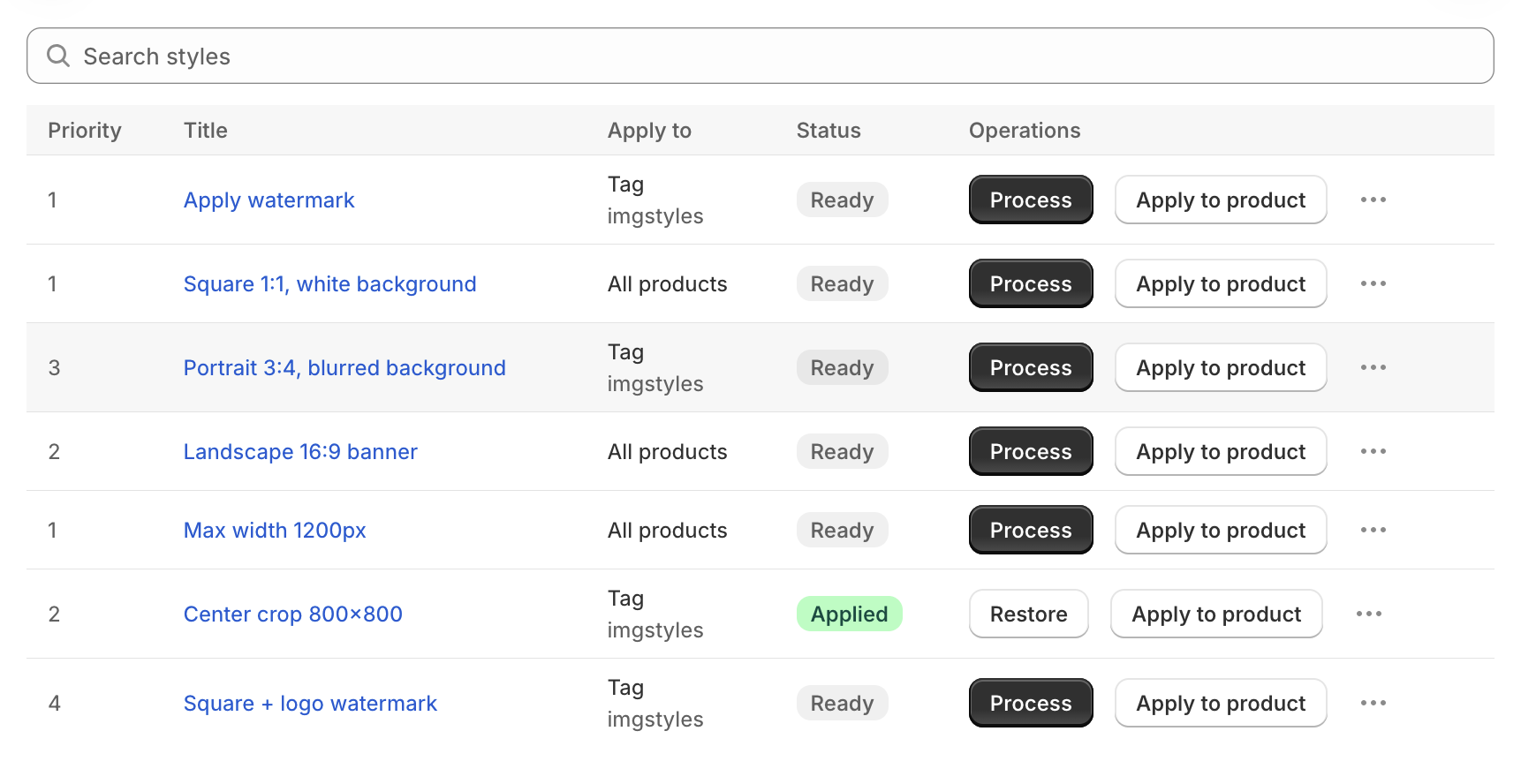
Use Search styles to find a style by title. Click a style's title (or anywhere on its row) to edit it.
Columns
- Priority: the style's priority. When a product matches several styles, the highest priority wins.
- Title: the style's name.
- Apply to: the condition type (All products, Vendor, Product type or Tag) and its values.
- Status:
- Ready: the style has not been applied yet.
- Processing: the style is running.
- Applied: the style has been applied to your images.
- n failed: some images couldn't be updated. Click the badge to see them and retry. See Failed images.
- Operations: the actions below.
Operations
- Process: apply the style to all matching products. Shown when the style is Ready.
- Restore: roll back all images processed by this style to their original version. Shown after the style is applied. See Restore product images.
- Apply to product: apply the style to one product you choose.
- More actions (...):
- View products to apply: list the products that match the style's saved conditions.
- Clone: create a new style with the same settings.
- Delete: delete the style. This cannot be undone.
note
Only one style can run at a time. While a style is processing or restoring, the action buttons of the other styles are disabled.